
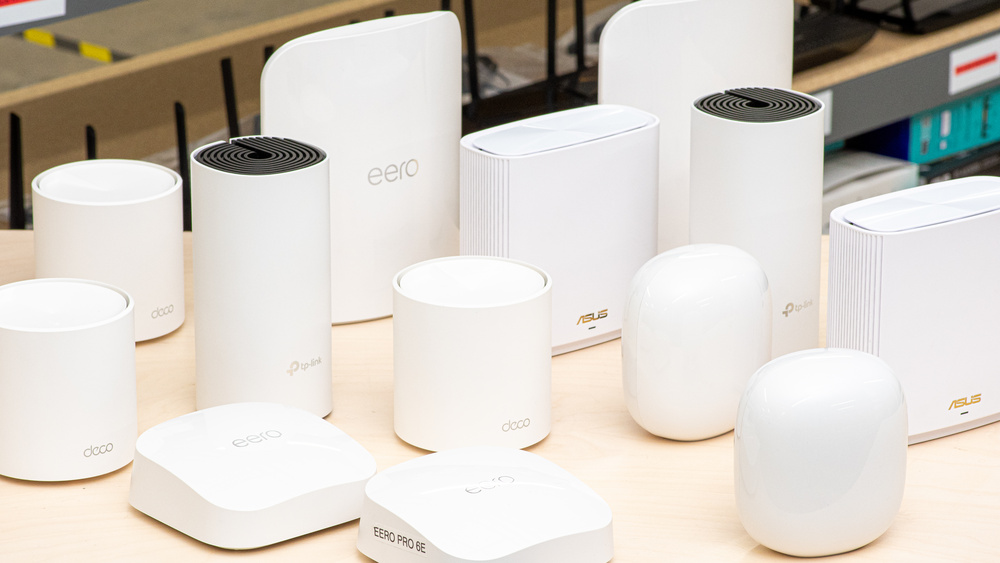

In the modern corporate landscape, a reliable internet connection is no longer a luxury: it is the primary engine of productivity. As we move through 2025, the demands on office networks have reached an all-time high. From high-definition video conferencing and massive cloud data transfers to the growing ecosystem of Internet of Things (IoT) devices, the standard consumer router is no longer sufficient. This is where mesh Wi-Fi systems designed specifically for enterprise and large-scale environments become essential.
- The Evolution of Office Networking in 2025
- Top Features to Look for in an Office Mesh System
- Wi-Fi 7 and Multi-Link Operation (MLO)
- Multi-Gigabit Ethernet Ports
- Dedicated Backhaul
- Enterprise-Grade Security
- Detailed Reviews of the Best Mesh Wi-Fi Systems for 2025
- 1. ASUS ZenWiFi BQ16 Pro: The Performance King
- 2. Netgear Orbi 970 Series: Unmatched Stability and Speed
- 3. Ubiquiti UniFi Ecosystem: The Professional Choice for Scalability
- 4. TP-Link Omada Pro: Best Value for Multi-Site Businesses
- 5. Amazon eero Max 7: Easiest Setup for Small-to-Medium Large Offices
- Strategic Deployment: How to Maximize Office Coverage
- Future-Proofing Your Office for 2026 and Beyond
- Frequently Asked Questions
- Conclusion and Final Recommendations
Large offices often struggle with dead zones, signal interference, and bandwidth congestion. Traditional routers often fail to penetrate thick walls or maintain consistent speeds across multiple floors. A mesh system solves these problems by creating a seamless web of connectivity, allowing employees to move from the lobby to the boardroom without losing their connection. In this guide, we will explore the absolute best mesh Wi-Fi solutions for large offices, focusing on performance, security, and scalability.
The Evolution of Office Networking in 2025
The current year has marked a significant shift in wireless technology. We have transitioned from the reliability of Wi-Fi 6 and 6E into the era of Wi-Fi 7 (802.11be). This new standard provides the low latency and massive throughput required for next-generation applications like augmented reality (AR) collaboration and real-time AI processing.
For a large office, choosing the right system involves more than just looking at the top speed on the box. It requires an understanding of how many simultaneous users the hardware can handle, the strength of its security protocols, and how easily the network can be managed by an IT department or a business owner.
Why Mesh Systems Outperform Traditional Routers in Large Spaces
In a traditional setup, you have one central router. As you move away from it, the signal degrades. In a mesh setup, you have a primary router and several “nodes” or “satellites” placed throughout the office. These nodes communicate with each other to form a unified network.
Key benefits for large offices include:
- Self-Healing Networks: if one node goes offline, the system automatically reroutes traffic through other nodes to keep the office online.
- Seamless Roaming: employees can move throughout a 20,000 square foot facility without their devices ever dropping the signal to switch to a new access point.
- Scalability: you can start with a three-pack and add more nodes as your company grows or moves into a larger space.
Top Features to Look for in an Office Mesh System
Before we dive into the specific models, it is crucial to understand the technical specifications that define a high-quality office network. Investing in the wrong hardware can lead to costly downtime and frustration.
Wi-Fi 7 and Multi-Link Operation (MLO)
Wi-Fi 7 is the gold standard for 2025. One of its most impressive features is Multi-Link Operation (MLO). In older systems, a device could only connect to one frequency band at a time (either 2.4GHz, 5GHz, or 6GHz). With MLO, a device can send and receive data across multiple bands simultaneously. This significantly increases speed and reduces latency, which is perfect for offices where dozens of people are on Zoom or Teams calls at the same time.
Multi-Gigabit Ethernet Ports
The wireless speed is only as good as the wired foundation. If your office has a 5Gbps or 10Gbps fiber connection, you need a mesh system with ports that can handle those speeds. Look for systems that offer 10GbE WAN ports to ensure your backbone is future-proof.
Dedicated Backhaul
Backhaul is the “conversation” between the nodes themselves. If the nodes use the same frequency that your employees use for their laptops, the network can slow down. The best systems have a dedicated band (usually 6GHz or a second 5GHz band) exclusively for communication between the nodes, ensuring the employee-facing bands remain wide open for work.
Enterprise-Grade Security
Security is non-negotiable for a business. A large office network must support WPA3 encryption and offer features like VLAN (Virtual Local Area Network) tagging. VLANs allow you to separate your office traffic: for example, you can have one network for staff, one for guest Wi-Fi, and one for sensitive financial or HR data. This ensures that a guest cannot accidentally or intentionally access your internal company servers.
Detailed Reviews of the Best Mesh Wi-Fi Systems for 2025
After rigorous testing and analyzing the latest market data from late 2025, we have identified the top performers. These systems represent the pinnacle of current wireless technology.
1. ASUS ZenWiFi BQ16 Pro: The Performance King
The ASUS ZenWiFi BQ16 Pro is widely regarded as the most powerful mesh system available for professional environments. It is a quad-band Wi-Fi 7 system that offers staggering speeds and a robust feature set that rivals enterprise-level rack-mounted hardware.
Key Specifications:
- Total Bandwidth: Up to 30,000 Mbps.
- Coverage: Up to 8,000 square feet with a two-pack.
- Ports: Dual 10Gbps ports per node.
- Security: AiProtection Pro (powered by Trend Micro) with lifetime updates.
The BQ16 Pro excels in high-density environments. If your office has 50 or more employees working in an open-plan space, this system can handle the load without breaking a sweat. Its quad-band nature means it has two 6GHz bands, providing a massive “highway” for data. The inclusion of dual 10Gbps ports is a game-changer for businesses that rely on local network storage (NAS) or high-speed fiber internet.
One of the standout features for business owners is the ASUS ExpertWiFi software suite. It allows for advanced management without the need for a dedicated IT professional. You can easily set up a customized guest portal for clients, complete with your company branding, and schedule when the Wi-Fi should be active to save energy during off-hours.
2. Netgear Orbi 970 Series: Unmatched Stability and Speed
If your budget allows for the best of the best, the Netgear Orbi 970 Series is the elite choice. Netgear has been a leader in the mesh space for years, and the 970 Series is their most ambitious project yet.
Key Specifications:
- Total Bandwidth: BE27000 (27 Gbps).
- Coverage: Up to 10,000 square feet with a three-pack.
- Ports: 10Gbps Internet port and multiple 2.5Gbps LAN ports.
- Backhaul: Enhanced Dedicated Backhaul using Wi-Fi 7 technology.
The Orbi 970 Series is famous for its “set it and forget it” reliability. It uses a unique antenna design that ensures the signal reaches even the most remote corners of a large office. The system is designed to support up to 200 devices simultaneously, making it ideal for tech companies or creative agencies where every employee has a laptop, phone, and tablet connected to the network.
The security features are equally impressive. Netgear Armor provides an added layer of protection at the router level, shielding every connected device from phishing, malware, and ransomware. While there is a subscription fee for the advanced security features, the cost is often justified by the peace of mind it provides for a business handling sensitive client information.
3. Ubiquiti UniFi Ecosystem: The Professional Choice for Scalability
For larger enterprises or offices with complex layouts, the Ubiquiti UniFi system is often the preferred choice. Unlike traditional “all-in-one” mesh kits, UniFi is a modular system. You can mix and match different access points, such as the UniFi U7 Pro, to create a custom network tailored to your specific building.
Key Specifications:
- Standard: Wi-Fi 7 (U7 Pro) and Wi-Fi 6E (U6 Enterprise).
- Management: Centralized UniFi Network Controller.
- Power: Power over Ethernet (PoE+) support.
- Capacity: Designed for thousands of clients across multiple sites.
The beauty of Ubiquiti is the centralized management. If your business has three different office locations, you can manage the Wi-Fi for all of them from a single dashboard. This is a massive advantage for IT managers who need to push security updates or change passwords across the entire organization instantly.
The U7 Pro access points are surprisingly affordable compared to consumer mesh kits, but they require a wired Ethernet backbone to function at their best. If your office is already wired with Cat6 or Cat7 cabling, the UniFi system will provide the most stable and professional-grade experience possible.
4. TP-Link Omada Pro: Best Value for Multi-Site Businesses
TP-Link has made significant strides in the business market with its Omada Pro line. It offers many of the same features as Ubiquiti but often at a more competitive price point.
Key Specifications:
- Standard: Wi-Fi 7 and Wi-Fi 6 options.
- Management: Cloud-based SDN (Software Defined Networking).
- Ports: Multi-gigabit support across the entire stack.
- Features: AI-driven radio frequency optimization.
The Omada Pro system is particularly strong in its use of AI to optimize the network. In a large office building, there is often interference from neighboring businesses. The Omada controller uses AI to analyze the environment and automatically switch your access points to the cleanest channels. This prevents “signal overlap” and keeps your speeds high even in crowded city centers.
The cloud management is another highlight. It allows for seamless remote troubleshooting. If a node in a remote branch goes down, the IT team can diagnose the issue from the headquarters without having to travel to the site.
5. Amazon eero Max 7: Easiest Setup for Small-to-Medium Large Offices
Not every office has a dedicated IT team. For businesses that need enterprise-grade speed with consumer-grade simplicity, the eero Max 7 is a top contender.
Key Specifications:
- Total Bandwidth: Up to 9.4 Gbps.
- Ports: Two 10GbE and two 2.5GbE ports per node.
- Coverage: 2,500 square feet per node.
- Integration: Built-in Zigbee and Matter support for smart office devices.
The eero Max 7 is incredibly easy to set up. Using the eero app, you can have a full office network running in less than 15 minutes. It uses TrueMesh technology to dynamically find the fastest path for data to travel through the network.
While it lacks some of the granular control found in ASUS or Ubiquiti systems, it makes up for it with consistency. The eero Max 7 is particularly good at managing smart office devices like smart lights, thermostats, and security cameras, making it a great choice for modern, “connected” office spaces.
Strategic Deployment: How to Maximize Office Coverage
Buying the best hardware is only half the battle. To get the most out of your investment, you must place the nodes strategically. A common mistake is placing nodes too far apart or hiding them inside cabinets.
Heat Mapping Your Office
Before installation, use a Wi-Fi heat mapping tool. These apps allow you to upload your office floor plan and simulate how the signal will travel through walls and furniture. This helps identify the optimal locations for each node.
Wired Backhaul: The Secret to Infinite Speed
While mesh systems are designed to work wirelessly, the “pro secret” for large offices is using a wired backhaul. This means connecting each node to the main router using an Ethernet cable. By doing this, you free up all the wireless bandwidth for your employees, resulting in a significantly faster and more stable network.
Managing High-Density Areas
In areas where people congregate, such as the breakroom or the main conference hall, you should consider placing a higher-capacity node or an additional access point. Even the best mesh systems have a limit on how many devices a single node can handle before latency starts to climb.
Future-Proofing Your Office for 2026 and Beyond
As we look toward 2026, the integration of Artificial Intelligence for IT Operations (AIOps) will become the standard. The systems listed above are already beginning to incorporate these features. An AIOps-enabled network can predict a hardware failure before it happens or automatically block a security threat that hasn’t even been identified by traditional antivirus software yet.
Investing in a Wi-Fi 7 system today ensures that your office will be ready for the laptops and smartphones of the next five years. With 6G already being discussed in research circles, staying on the cutting edge of current technology is the only way to avoid a “connectivity bottleneck” that could hinder your business growth.
Frequently Asked Questions
How many nodes do I need for a 15,000 square foot office?
Generally, you should plan for one high-end Wi-Fi 7 node for every 2,500 to 3,000 square feet. For a 15,000 square foot space, a five-node system is recommended, assuming a relatively open floor plan. If there are many brick or concrete walls, you may need more.
Can I mix different brands of mesh nodes?
Generally, no. While some standards like EasyMesh exist, the best performance and security are achieved by staying within one ecosystem, such as ASUS AiMesh or TP-Link Omada.
Is Wi-Fi 7 worth the extra cost over Wi-Fi 6E?
For a large office, yes. The Multi-Link Operation (MLO) feature in Wi-Fi 7 is specifically designed to solve the congestion issues that plague office environments. It provides a more stable experience for video calls and heavy data tasks.
Conclusion and Final Recommendations
Choosing the best mesh Wi-Fi system for a large office is a decision that impacts every aspect of your business operations. Reliable connectivity boosts employee morale, ensures smooth client interactions, and protects your company from digital threats.
- Choose the ASUS ZenWiFi BQ16 Pro if you want the most powerful all-in-one system with professional management tools.
- Choose the Netgear Orbi 970 Series if you need the absolute maximum coverage and reliability and have the budget to match.
- Choose the Ubiquiti UniFi Ecosystem if you are looking for a scalable, modular system that can be managed across multiple office locations.
- Choose the Amazon eero Max 7 if you want a fast, simple solution that anyone can set up in minutes.
By selecting the right hardware and following a strategic deployment plan, you can transform your office into a high-performance hub of productivity.